%20scale(1.0)%22%3E%3Cpath%20fill%3D%22%23102828%22%20d%3D%22M16%2024H32V64H72V80H16Z%22%2F%3E%3Cpath%20fill%3D%22%23008779%22%20d%3D%22M44%2016H80V52H64V43L46%2061L35%2050L53%2032H44Z%22%2F%3E%3C%2Fg%3E%3C%2Fsvg%3E)
How to test a business idea with a landing page
Before investing in equipment or a full website, give potential customers one concrete offer to respond to. This guide takes a small garden-tidying idea through the current LaunchMyHustle editor, shows a completed illustrative page, and gives you a way to record inquiries. The goal is useful conversations, not proof that a business will succeed. LaunchMyHustle supports local, remote and online service ideas; the garden offer here is one worked example.
Start with one customer and one offer
Choose a job you can realistically deliver, an area you can cover, and a next step you can follow through on. For this worked example, the audience is homeowners with small front gardens in Oak Park. The offer is hand-weeding and tidying, with scope and a quote agreed before booking.
Oak Park Garden Tidy is a fictional service used only to illustrate the product. It is not a customer, a trading business, or evidence of demand. The example deliberately excludes tree work, pesticides and waste removal. Replace every detail with what you can actually offer; if you are only testing interest, say that on the page.
For a remote or online service, the same test could focus on document formatting for independent consultants. An illustrative offer is: Clean up the formatting in your report. Standardize headings, spacing and page numbers in one draft; agree the scope and quote first. Ask for an email, approximate page count, file format and deadline in an inquiry, then discuss the job privately. Exclude research, fact-checking and writing unless you provide them. This is another fictional offer, not a customer or result; the landing page collects an inquiry rather than delivering or selling a file.
Still deciding which service to offer? Use the free side-hustle quiz to explore ideas that fit your interests and resources, then return here to plan your next step.
- Customer: homeowners who want help with a small front garden.
- Offer: hand-weeding and a tidy, subject to an agreed scope and quote.
- Next step: ask about availability; a request is not a confirmed booking.
- Test limit: choose a review date and a time or spending cap before sharing.
1. Describe your idea and name your business
Open LaunchMyHustle and enter your name and email in the initial setup. Choose I have an idea, type Small front-garden tidying in Oak Park, and continue. This example uses the custom-idea path. You can also browse the services under Help me choose. Starter copy comes from templates, not AI-generated business advice.
Enter your business name, continue, and select Build my page. In Your business, check What you offer and Where you work. For this example, use Oak Park Garden Tidy, Small front-garden tidying in Oak Park, and Oak Park. A service area is enough; you do not need to put your home address on the page.
2. Review your offer and remove anything you do not provide
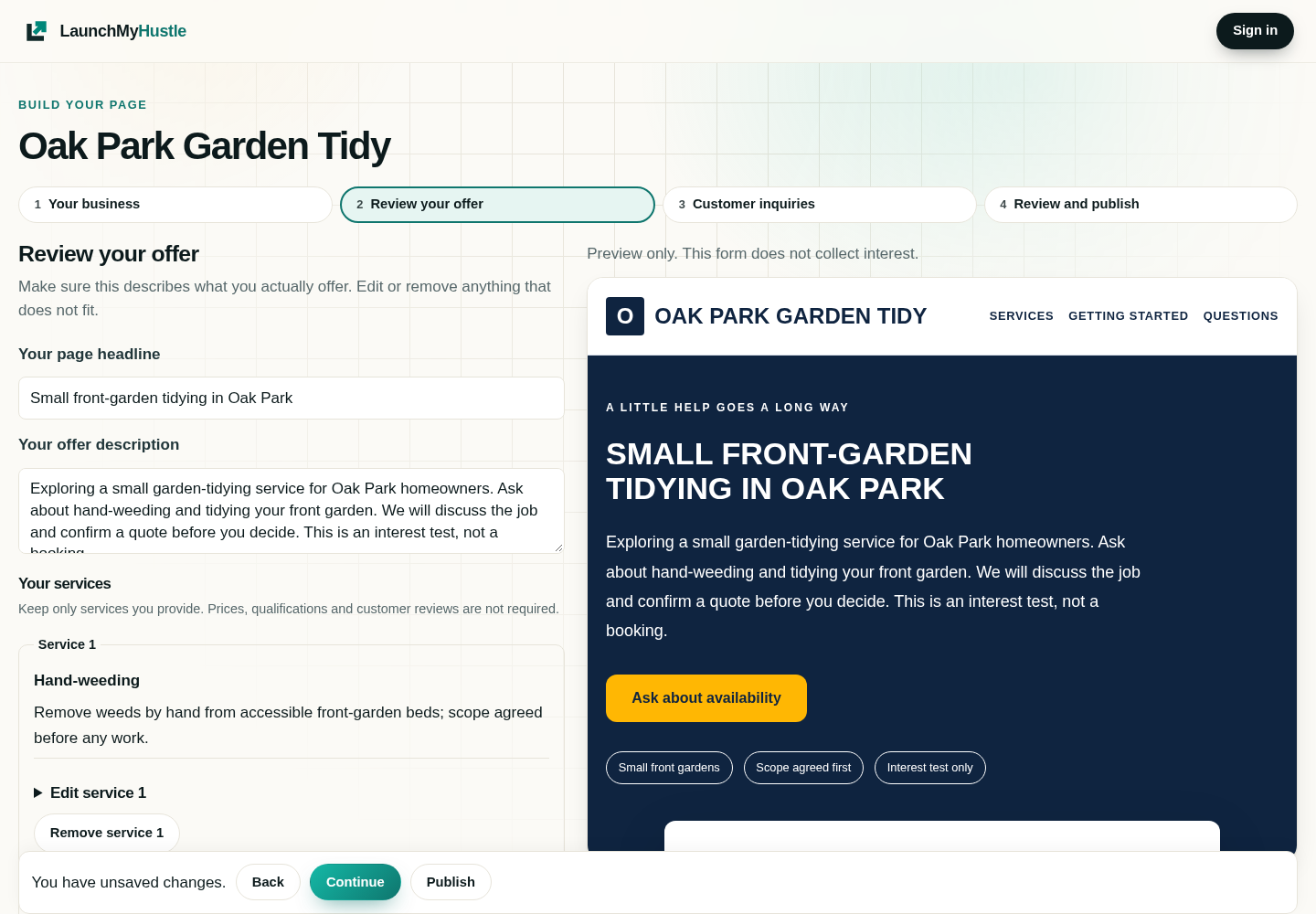
Open Review your offer. Edit Your page headline and Your offer description, then edit or remove the starter services. A starter may cover more work than your first offer, so check the whole page, including FAQs and other copy under Customize your page (optional) and More page settings.
The screenshot below is an actual local capture of the current editor using invented example content. No customer account, private draft, lead, payment detail or authentication token appears in it. You can open either screenshot at full size.
A completed illustrative offer you can adapt
Headline: Small front-garden tidying in Oak Park. Description: Exploring a small garden-tidying service for Oak Park homeowners. Ask about hand-weeding and tidying your front garden. We will discuss the job and confirm a quote before you decide. This is an interest test, not a booking.
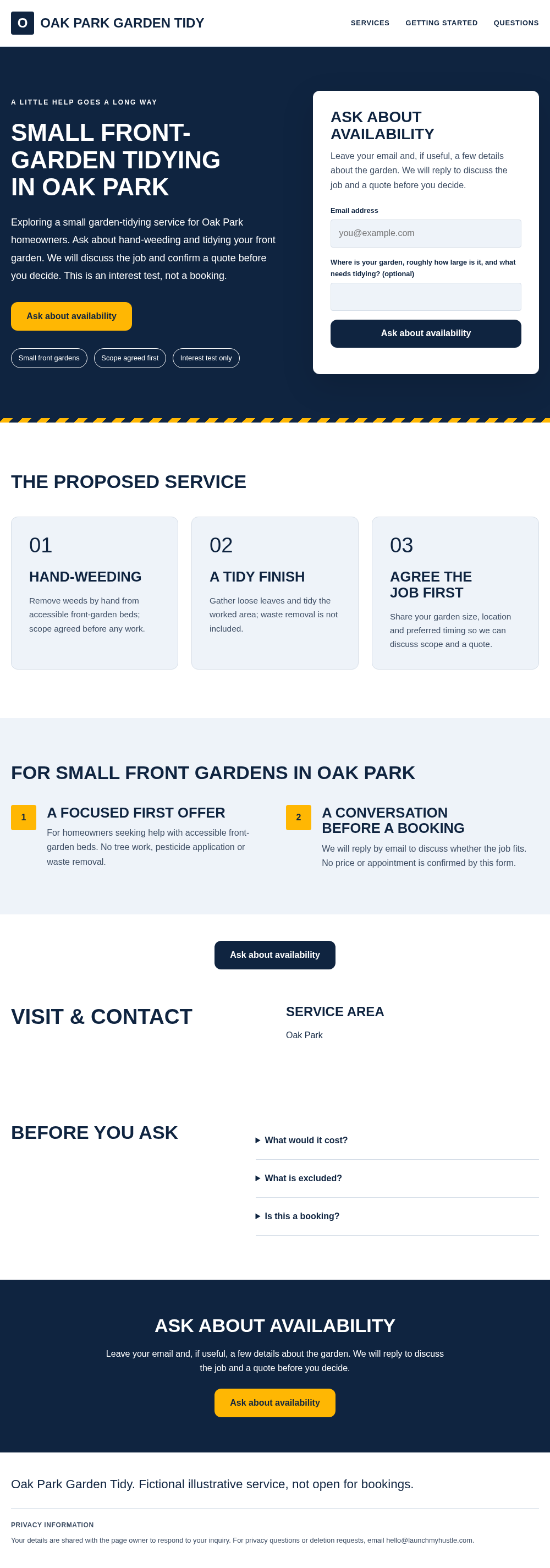
Services: Hand-weeding: Remove weeds by hand from accessible front-garden beds; scope agreed before any work. A tidy finish: Gather loose leaves and tidy the worked area; waste removal is not included. Agree the job first: Share your garden size, location and preferred timing so we can discuss scope and a quote.
Limits: No tree work, pesticide application or waste removal. Pricing: Quote after discussing the garden and access; no price or appointment is confirmed by the form. Next step: Ask about availability. Follow-up: We will reply by email to discuss whether the job fits; promise a reply time only if you can meet it.
This static screenshot comes from the existing landing-page preview and shared public-page renderer. It shows the complete example; the form cannot submit and there is no live service or customer workspace behind it.
3. Choose useful customer questions and preview the page
In Customer inquiries, open Change customer questions (optional). Keep customer email required so you can reply; ask for a name or phone only if useful. For this example, use one optional question: Where is your garden, roughly how large is it, and what needs tidying? Set Send button wording to Ask about availability.
In Review and publish, use Preview to read the page as a visitor. Check the offer, area, exclusions, questions and privacy text, including on a phone. The editor preview form is disabled and does not collect inquiries. Design changes, colors and your own permitted photos are optional; do not add stock photos as evidence of work you have done or invent reviews.
4. Save, choose an address and review the trial before publishing
Exploring ideas and previewing are free before checkout. Sign in when prompted to save a private draft or continue publishing. Save draft preserves your work; it does not put the page online. Before first publication, choose an available Hosted address name. The page uses that name on lmpages.com, and the name becomes permanent after successful publication.
Publishing starts the 14-day trial after successful Stripe Checkout. A card/payment method is required; the price after the trial is $19 USD per calendar month, including applicable tax. Cancel before the trial ends to avoid charges. Review the current pricing and refund terms before checkout. This walkthrough and its screenshots stop at local preview; no subscription was started for the example.
After publication, use Open live page or Copy link to share your page. View page leads takes you to inquiries; Your leads provides saved submissions, email-alert controls and CSV download. Editing and saving a draft does not update the live snapshot until you publish the update.
Reach people who could actually become customers
Share the page in one relevant place that permits service posts, or ask someone for a specific introduction. Use the same offer and area so you can tell whether questions concern the service you meant to test. Keep a record of the sharing channel and page version. LaunchMyHustle does not automatically supply traffic or customers.
Our first-customers guide explains introductions, local communities and useful replies, with a practical first-week plan. A test with little relevant traffic tells you very little about demand; it may tell you more about the channel than the idea.
Inquiry-tracking checklist: copy this into a private record
Use a private spreadsheet or notebook with one row per inquiry. Copy these field names as your headings: Received date | Page version | Source | Contact reference | Service-area fit | Requested job and timing | Question or objection | Next action and due date | Outcome. Keep contact details private and only as long as needed. Ask how the person found you if the source is unclear; do not treat attribution as certain.
Blank row to fill in: [date] | [headline/version] | [channel or unknown] | [private lead reference] | [yes/no/unknown] | [job/timing] | [question] | [reply or quote, due date] | [new/replied/quoted/booked/completed/declined/no response]. These are suggested manual fields, not extra features in the product dashboard. No example customer or outcome is supplied.
- Before sharing: record the offer version, service area, channel, review date and spending cap.
- For each inquiry: confirm whether the location and job fit; distinguish an inquiry from an agreed booking.
- Reply: answer the actual question, clarify scope and quote, and record the agreed next step and date.
- Follow up: if appropriate, send one useful reminder; respect a decline and do not infer a sale from silence.
- At review: count relevant inquiries, replies, quotes, agreed bookings and completed paid jobs separately; record costs separately too.
- Compare: note recurring questions, out-of-area requests and missing information, then choose one change to test next.
Read inquiries alongside the numbers and choose one next step
Use page views and sign-up rates as context alongside the conversations. Published pages measure visits, clicks and submissions automatically without cookies, while respecting Do Not Track and Global Privacy Control. Blocking and delivery delays can leave gaps, and small samples vary. A form submission is an expression of interest, not a sale or proof of profitable demand.
Repeated questions about scope may suggest clearer copy; requests outside your area may suggest a targeting change. No response may mean too few suitable people saw the page. These are possibilities to investigate, not conclusions the tool can guarantee. At your review date, narrow the audience, clarify one part of the offer, try a better channel, or stop. There are no guaranteed leads, bookings, earnings or search rankings.